
Cut Your LLM Costs by 3.9x Without Sacrificing Quality
The Problem You Recognize
You use Large Language Models (LLMs) for customer support, search, or AI agents. Every query costs money. You know caching—reusing past answers—can save you a fortune.
But you’re stuck. Reuse an old answer, and you risk giving a customer wrong or outdated information. Pay for a fresh answer every time, and your costs are out of control. It feels like you can’t win.
What Researchers Discovered
A team of researchers built a smarter caching system called Krites. It treats different types of cached answers differently. This simple change delivered a massive result: a 3.9x reduction in LLM operating costs while keeping response quality high.
Think of it like a grocery store. You have two sections:
- The Static Cache: Pre-packaged, vetted goods. Think canned soup or boxed pasta. These are safe, common answers you’ve already checked.
- The Dynamic Cache: The deli counter. These are live-generated answers from previous user requests. They’re fresh but haven’t been fully inspected.
Old caching systems used one rule for both sections. It was like having the same security guard for the soup aisle and the diamond vault. You were either too strict (missing savings) or too loose (risking errors).
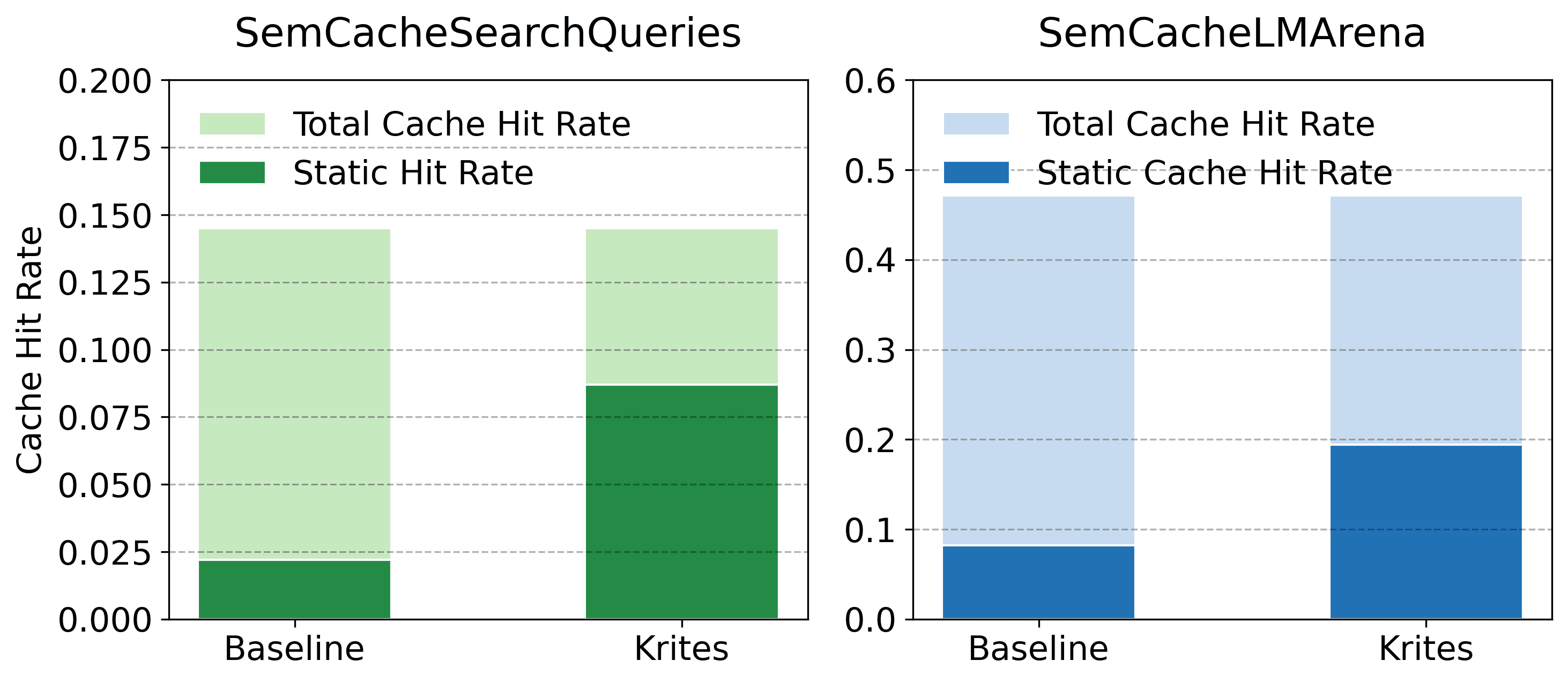
Krites uses different rules. It’s more aggressive with the safe, static cache. It’s more careful with the live, dynamic cache. This lets you reuse more safe answers without risking bad ones.

Figure: Krites (shown in blue) achieves a higher cache hit rate, meaning it reuses more answers, leading to lower costs.
The system also works asynchronously. It serves cached answers to users immediately. Then, in the background, it quietly verifies if those answers are still good or need updating. Users get speed. Your system gets smarter. Everyone wins.
You can read the full research paper here: Asynchronous Verified Semantic Caching for Tiered LLM Architectures.
How to Apply This Today
You don’t need to build Krites from scratch to get its benefits. You can implement its core principle: tiered caching with different verification rules. Here is your action plan.
Step 1: Audit Your Current LLM Queries
First, you need data. For one week, log every LLM query your application makes. Capture:
- The exact user question (the "prompt").
- The LLM's full response.
- The topic or intent (e.g., "return policy," "product specs," "troubleshooting step X").
Tool to use: Your application's existing logging. Or, use a framework like LangSmith or Phoenix to trace and evaluate LLM calls automatically.
For example: A customer service bot might get 1,000 questions about "how to reset my password" in a week. Log them all. This shows you your high-volume, repetitive queries.
Step 2: Build Your "Static" Knowledge Vault
Now, create your first cache tier: the safe, pre-vetted answers.
- From your audit, identify the top 20 most frequent questions.
- For each question, have a human expert (or a very high-confidence automated check) craft and approve the single best answer. This is your "golden" response.
- Store these question-answer pairs in a fast database. This is your Static Cache. Treat it as your source of truth.
Tools to use: A simple Redis or PostgreSQL database. Use a vector embedding model (like from OpenAI or Cohere) to convert questions into numerical vectors for fast similarity search.
Step 3: Implement Your "Dynamic" Response Archive
Your second tier is for everything else.
- Set up another cache database. This is your Dynamic Cache.
- Whenever the LLM generates a new answer for a question not in your Static Cache, store that query and response here.
- Flag these entries as "unverified."
How it works: A user asks, "What's the compatibility of Product A with accessory B?" It's not in your static vault, so the LLM generates a new answer. You serve it to the user and also save it to the Dynamic Cache for potential future reuse.
Step 4: Apply Different Verification Rules
This is the key. Create two different rules for deciding when to reuse a cached answer.
- Rule for Static Cache (Aggressive Reuse): If a new user question is >90% similar to a question in your Static Cache, serve the pre-vetted answer immediately. No LLM call needed. You trust this vault.
- Rule for Dynamic Cache (Careful Reuse): If a question is >95% similar to one in the Dynamic Cache, you have a choice. For speed, serve it but flag it for background verification. For safety, send it to the LLM for a fresh answer and use the result to update the cache.

Figure: The Krites policy diagram shows the separate decision paths for static vs. dynamic cache entries.
Step 5: Run Asynchronous Verification
Don't let verification slow down users. Set up a background job (a "cron job" or queue worker) that:
- Picks "unverified" entries from the Dynamic Cache.
- Sends the original question back to the LLM to get a fresh answer.
- Compares the new answer to the cached one.
- If they match (are semantically equivalent), mark the cached entry as "verified." If not, update it or delete it.
This keeps your caches fresh and accurate without impacting user response times.
What to Watch Out For
This approach is powerful, but be aware of its limits.
- The First Step is Manual: The research doesn't solve how to initially decide what's "safe enough" for the Static Cache. You must invest human review time to seed this vault with high-quality answers. This is an upfront cost for long-term gain.
- Not for Rapidly Changing Info: If your answers change daily (e.g., stock prices, live sports scores), even a vetted static answer becomes wrong quickly. This system works best for relatively stable information.
- You Need Query History: To build effective caches, you need a sufficient volume of user queries to analyze. A brand-new application with no traffic won't see immediate benefits.
Your Next Move
Start small. This week, complete Step 1.
Pick one LLM-powered feature in your product. Turn on detailed logging for all its interactions for the next seven days. Just gather the data. Don't try to build anything yet.
At the end of the week, look at the logs. What single question is asked most often? That’s your first candidate for a static, vetted answer. That’s where your 3.9x cost reduction journey begins.
What's the most expensive LLM query your team is running today? Share it in the comments—let's brainstorm if it's a candidate for this tiered caching approach.
Comments
Loading...