
Your Data Center Is Wasting Money. Here's How to Fix It.
Your servers are running. They're consuming power. But are they working hard? Probably not. For most cloud providers and large companies, physical servers in data centers run at low capacity. Virtual machines (VMs) are placed inefficiently. This leaves resources idle while still costing you money for power, cooling, and rack space.
This waste is silent. It happens automatically in your orchestration system. But new research gives you a clear path to fix it.
What Researchers Discovered
Researchers from Nanyang Technological University evaluated how different computer programs place virtual machines in data centers. They published their findings in Evaluation of Dynamic Vector Bin Packing for Virtual Machine Placement.
Think of it like a hotel manager assigning rooms. Guests (VMs) arrive constantly. The manager doesn't know how long each guest will stay. They also don't know when future guests will book. The manager must make smart decisions in real-time to avoid empty rooms.
This is exactly what happens in your data center. VM requests come in constantly. Your system needs to place them efficiently without knowing the future.
The researchers tested three types of algorithms:
- No future knowledge: The algorithm makes decisions with zero information about what's coming next.
- Perfect future knowledge: The algorithm knows every future VM request in advance (an ideal but impossible benchmark).
- Learning-augmented: The algorithm uses machine learning to predict what might happen next, based on past data.
This last type is the most practical. It's like a driver using Waze instead of a static map. Waze predicts traffic based on real-time and historical data to find the best route.
The core goal of all these algorithms is to minimize the total "usage time" of your physical machines. Imagine you need ten hours of work from power tools. You could turn on ten tools for one hour each. Or you could use two tools for five hours each. The second option is more efficient. It saves the "idle time" of the other eight tools.
Minimizing server "on-time" directly lowers your electricity bill. It reduces cooling needs. Over time, it can mean you need fewer physical servers. This tackles the biggest cost drivers in any data center.

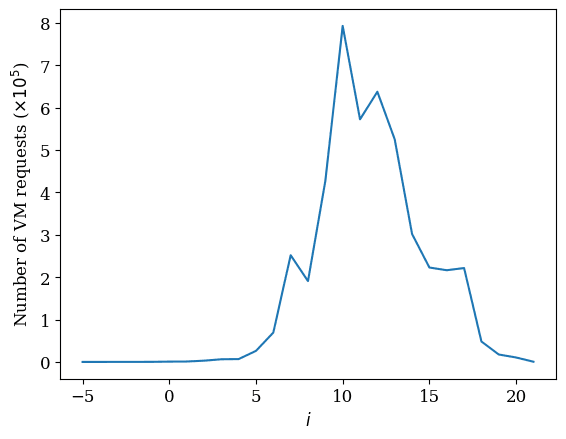
The research analyzed real VM request patterns. This chart shows how many VMs run for different lengths of time. Most VMs have short lifespans, which makes efficient placement a complex, ongoing puzzle.
How to Apply This Today
You don't need to wait for a perfect solution. You can start improving your VM placement efficiency this quarter. Follow these four steps.
Step 1: Audit Your Current Placement Strategy
First, you need to know what you're using now. Most platforms use a default scheduler. For example, Kubernetes often uses the kube-scheduler with its default scoring. VMware DRS has its own logic.
Action:
- Identify your orchestration platform (Kubernetes, OpenStack, VMware vSphere, etc.).
- Document the current scheduling policy or algorithm. Is it "spread" (distributing VMs) or "bin pack" (consolidating VMs)? Check your configuration files or admin console.
- Measure your current server utilization. Use tools like Prometheus with Grafana for Kubernetes, or vRealize Operations for VMware. Look for average CPU and memory usage across your cluster over a week.
For example: A team running a large Kubernetes cluster discovered their nodes averaged 35% CPU utilization. Their default scheduler was configured for high availability, which spread pods thinly. This left a lot of capacity unused.
Step 2: Benchmark Against the "Best Fit" Algorithm
The research shows that a simple "Best Fit" algorithm is a strong baseline. It places a new VM on the server that has the least remaining capacity that can still fit it. This is better than "First Fit," which just uses the first available server.
Action:
- If your platform allows it, switch your scheduler's policy to a "Best Fit" or "Most Allocated" strategy for a test cluster.
- Run this test for at least 48-72 hours to capture different workload patterns.
- Compare the average node utilization and total number of active nodes to your baseline from Step 1.
This simple change can often consolidate workloads onto 10-20% fewer servers immediately.

The research measured algorithm performance by the total "machine usage time." This chart shows how a basic Best Fit algorithm performs, establishing a benchmark you can try to beat.
Step 3: Pilot a Learning-Augmented Scheduler
This is where you capture the next level of efficiency. A learning-augmented algorithm uses historical data to predict VM behavior, like how long a VM will run.
Action:
- Choose a platform: For Kubernetes, investigate schedulers like Katalyst (from ByteDance) or the Deep Reinforcement Learning Scheduler. For VMware, look into vSphere with Tanzu and its intelligent scheduling features.
- Set up a pilot: Dedicate a non-production cluster or a segment of your production environment (e.g., one availability zone) for the pilot.
- Feed it data: Ensure the pilot cluster's monitoring is collecting VM/pod lifecycle data—start time, requested resources, and end time.
- Measure the difference: After two weeks, compare the pilot's server utilization and total active nodes against your "Best Fit" benchmark cluster.
The goal is to see if predictive packing lets you run the same workloads on fewer machines, reducing the total "usage time."

The study's "Hybrid" algorithms use predictions to make better placement choices. The chart shows they can perform significantly closer to the ideal, perfect-knowledge benchmark, which is the real prize for reducing costs.
Step 4: Calculate the Savings and Plan Your Rollout
Efficiency gains are meaningless unless they translate to business metrics.
Action:
- Translate nodes to dollars: If your pilot used 15% fewer nodes, calculate the cost. Include compute instance costs, estimated power, and cooling savings.
- Build a business case: Present the pilot results, the calculated annual savings, and a low-risk rollout plan to your leadership.
- Roll out in phases: Start with the most predictable, batch-oriented workloads. Then move to more variable production services.
A medium-sized enterprise (500+ VMs) implementing these steps can realistically target a 20-30% reduction in active server count within 12 months.
What to Watch Out For
This approach is powerful, but be aware of the limitations.
- Real-world constraints are complex. The research model focuses on CPU/memory. Your real clusters must also consider network bandwidth, GPU availability, special hardware, and maintenance windows. A good scheduler lets you set these constraints.
- Don't over-consolidate. Packing VMs too tightly increases risk. If one server fails, more workloads go down. Always balance efficiency with resilience. Keep enough headroom for failure recovery and workload spikes.
- Prediction is not perfect. Machine learning models can be wrong. Your system must handle mispredictions gracefully. This means having a fallback strategy, like allowing a VM to move (migrate) if it's placed poorly.
Your Next Move
Start by auditing your current state. This week, pick one cluster and answer these questions: What is the average node utilization? What scheduling policy is active?
Once you have that number, you have a baseline. You can then measure every improvement against it. The path from 40% utilization to 65% utilization is a direct path to lower costs and a more sustainable operation.
Question for you: What's the average utilization across your primary cluster right now? Share in the comments—let's see where the industry stands.
Comments
Loading...