
Your AI Is Failing on Blurry Photos. Here's How to Fix It.
Your customer uploads a blurry photo of a broken appliance. Your AI assistant confidently recommends the wrong replacement part. The customer gets frustrated. You lose the sale.
This happens every day. Businesses using AI for visual search, photo-based support, or document analysis are losing money. Their systems work perfectly with clean, studio-quality images. But they fail with the messy, real-world pictures customers actually send.
What Researchers Discovered
Researchers from multiple universities studied why AI systems fail with imperfect images. They published their findings in Fix Before Search: Benchmarking Agentic Query Visual Pre-processing in Multimodal Retrieval-augmented Generation.
They found current AI search systems treat all pictures as perfect. Real-world pictures are often blurry, tilted, or unclear. Think of it like handing a librarian a smudged, sideways request note. They'll likely bring back the wrong book.
Your AI-powered visual search is failing silently on real customer interactions. This leads to wrong answers, missed sales, and poor user experience.

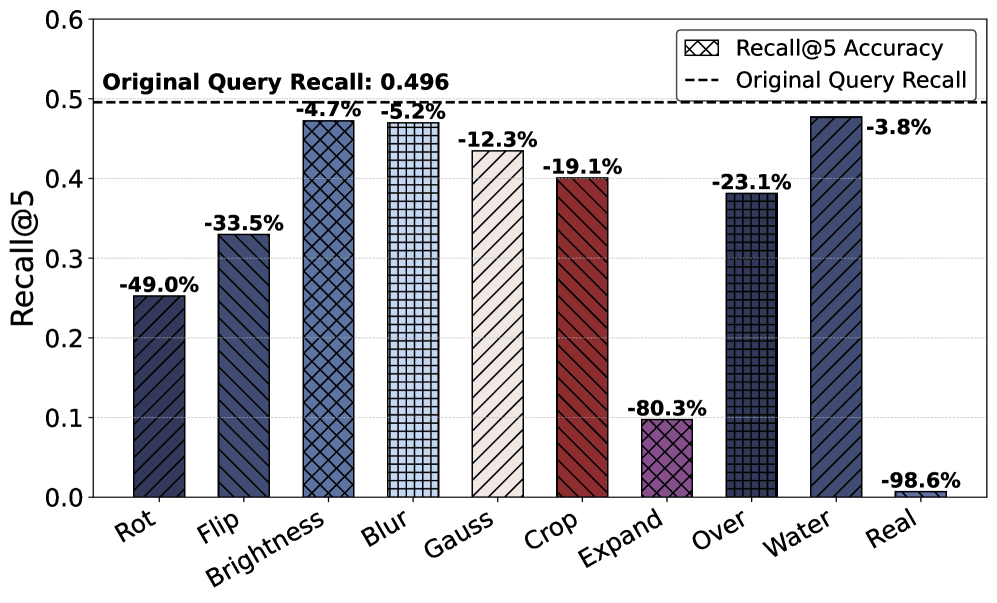
The research shows these "imperfect" visual queries cause catastrophic failures. A single typo in a web search might give less relevant results. A blurry or tilted image can cause the AI to retrieve completely unrelated information. This isn't a minor drop in accuracy—it's a complete system breakdown.
The solution is simple: fix the visual query before searching. The researchers call this "agentic visual pre-processing." Before giving the smudged note to the librarian, you clean it up, straighten it, and fill in missing words. Now the librarian can find the right book.
This represents a powerful shift in building AI pipelines. Add a "quality check and repair" step for images. This fix can make your existing AI investments more robust and valuable.
How to Apply This Today
You don't need to wait for perfect AI. You can implement visual pre-processing now. Here are five concrete steps to start this week.
Step 1: Audit Your Visual Failure Points
First, understand where your AI breaks. Look at your customer interaction logs. Identify patterns in failed visual queries.
- Review failed support tickets where customers uploaded images
- Analyze abandoned visual searches in your e-commerce platform
- Check document processing errors where scans or photos weren't readable
For example, a home improvement retailer might find 40% of "identify this part" queries fail when photos are taken at night with poor lighting. A bank might discover document verification fails when IDs are photographed at an angle.
Step 2: Choose Your Pre-Processing Tools
Select tools based on your most common image problems. You don't need one model for everything. Start with what fixes your biggest pain points.
For blurry images: Use super-resolution models like Real-ESRGAN or SwinIR. For tilted documents: Use deskewing algorithms or perspective correction. For poor lighting: Use contrast enhancement or low-light enhancement models. For general quality: Start with basic OpenCV operations (sharpening, denoising, rotation).
Most tools are available as open-source libraries or commercial APIs. For quick testing, try Hugging Face's Transformers library with pre-trained models.
Step 3: Integrate the Fix-Before-Search Pipeline
Modify your existing AI workflow. Insert the pre-processing step between receiving the image and sending it to your AI model.
Here's a simple architecture:
```
Customer Upload → Image Pre-Processing → Your AI System → Response
```
For a customer service chatbot handling plant disease photos:
- Customer uploads blurry leaf photo
- Your system sharpens the image and corrects color balance
- The enhanced photo goes to your plant identification AI
- AI returns accurate diagnosis
Start with a single problem type. If blur is your biggest issue, implement just super-resolution first. Measure the improvement before adding more complexity.
Step 4: Train Your Team (or Your AI Agent)
The research shows AI agents can learn to select the right pre-processing tools. You can fine-tune a small vision-language model to recognize which fix to apply.

For example, Qwen3-VL-4B-Instruct improved significantly after fine-tuning. It learned to recognize when an image needed rotation versus when it needed brightness adjustment.
You can apply this approach:
- Collect examples of your problematic images
- Label which pre-processing operation each needs
- Fine-tune an open-source model like Qwen3-VL or LLaVA
- Deploy it as your "image quality router"
This creates an intelligent system that fixes images before searching.
Step 5: Measure and Iterate
Track specific metrics before and after implementation. Don't just measure overall accuracy. Measure accuracy on previously failing cases.
Key metrics to track:
- Visual query success rate: Percentage of image-based queries that return correct results
- First-contact resolution: For support, how often the AI gets it right on the first try
- Conversion rate: For e-commerce, how often visual searches lead to purchases
- Processing time: Added latency from pre-processing (aim for <500ms)
Set up A/B testing. Route 50% of queries through your new pipeline. Compare results with the old approach. If you see significant improvement, roll it out completely.
What to Watch Out For
This approach has limitations. Be aware of these three risks.
1. No universal fix-all model. The research benchmarks the need for pre-processing. It doesn't provide one model that fixes every problem. You'll need to choose or train models for your specific imperfections. Document scans need different fixes than user-submitted photos.
2. Added latency and cost. Every pre-processing step adds time. Some enhancement models are computationally expensive. Test your pipeline's speed with realistic traffic. Consider using optimized models or hardware acceleration.
3. Potential for over-processing. Sometimes "fixing" an image can remove important details. A model might oversharpen or alter colors incorrectly. Always validate that your enhancements actually improve downstream accuracy, not just make images look better to humans.

The figure above shows a successful correction. A vertically flipped image disrupts the AI's understanding. The fine-tuned agent correctly applies a vertical flip correction to recover the original orientation.
Your Next Move
Start small. This week, identify one visual failure pattern in your business.
Is it blurry product photos? Tilted document scans? Poorly lit support images? Pick one problem type that causes the most customer frustration or lost revenue.
Implement a single pre-processing fix for that problem. Use an open-source model or simple image processing library. Test it on 100 real examples. Measure if it improves your AI's accuracy.
This isn't about building perfect AI. It's about making your existing AI work reliably with real-world data. The fix is simpler than you think: clean up the image before you search.
Question for your team: What percentage of your visual queries are failing right now because of image quality issues? Find that number this week—it will shock you.
Comments
Loading...