
Stop Fixing the Same Code Over and Over: A Data-Driven Method to End Maintenance Madness
You know that feeling. Your team is stuck. Every sprint, developers spend hours—sometimes days—patching the same few files. New features get delayed. Morale drops. The budget for "maintenance" keeps growing, but the problems never seem to go away.
You're dealing with code hotspots. A tiny fraction of your codebase is causing the vast majority of your headaches. It's like having one leaky faucet that floods the entire house every few weeks.
The good news? Researchers have cracked the code on why this happens. And more importantly, they've given you a clear map to fix it.
What Researchers Discovered: Your Code Has Predictable Pain Points
A team of researchers analyzed over 90 open-source projects to understand why some code requires constant attention. Their findings, published in Source Code Hotspots: A Diagnostic Method for Quality Issues, are both simple and powerful.
First, the problem is concentrated. Just a small portion of the code—the hotspots—gets changed repeatedly. This small area consumes most of the maintenance effort.
Second, these hotspots follow patterns. The researchers didn't just find random problems. They identified 15 specific, recurring patterns that explain why code becomes a hotspot. Think of it like a mechanic's checklist for the most common reasons a car engine fails. Instead of guessing, you can now diagnose.
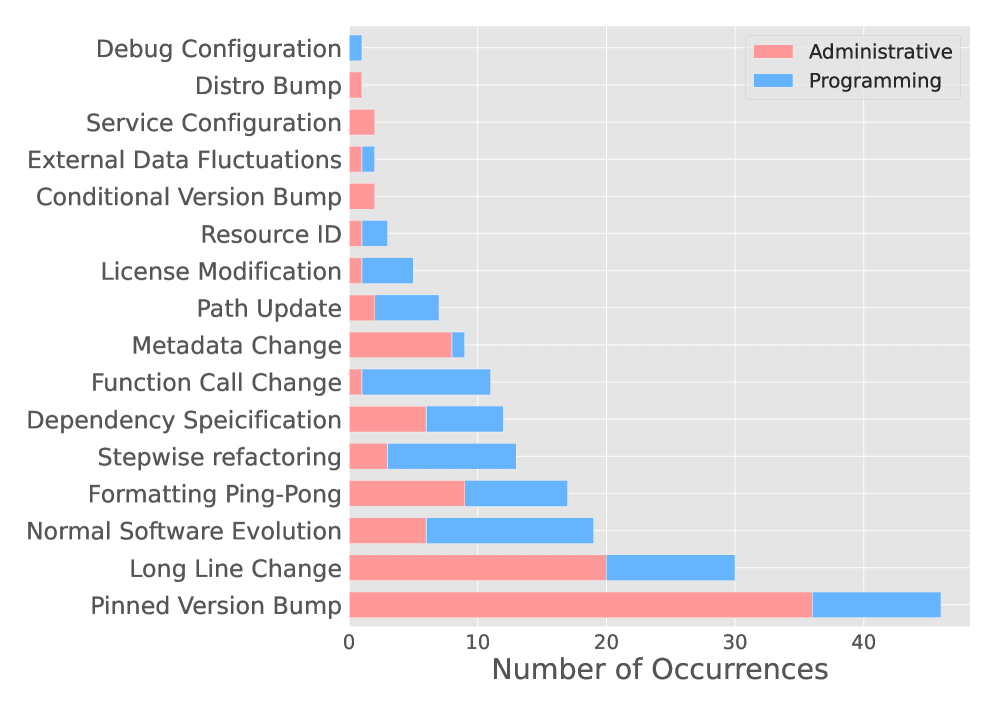
Two patterns account for nearly half of all hotspot problems:
- Pinned Version Bump (26% of cases): This is your release management headache. Code is tied to specific, hard-coded versions of libraries or dependencies. Every time one of those versions updates, you have to go in and manually change the code. It's brittle and creates unnecessary work.
- Long Line Change (17% of cases): This is a design flaw. Extremely long, complex lines of code are hard to read and even harder to modify safely. Developers have to untangle this "knotted rope" every time they need to make a change, increasing the chance of errors.
PAYLOAD_UPLOAD_32
Figure: The study found that Pinned Version Bump and Long Line Change are the most frequent culprits, making them prime targets for fixing first.
This research gives you something invaluable: a diagnostic framework. You're no longer fighting random fires. You're systematically identifying and eliminating the root causes of your technical debt.
How to Apply This Today: Your 4-Step Action Plan
You don't need a PhD to use these insights. Here is a practical, four-step plan you can start implementing this week. For a team of 5-10 developers, you can expect to see a measurable reduction in hotspot-related issues within 3-6 months.
Step 1: Find Your Hotspots (30 Minutes)
First, you need to see the problem. Use version control history to pinpoint your trouble spots.
Action: Run a simple git command on your main branch to list files changed in the most commits over the last year:
```bash
git log --since="1 year ago" --name-only --oneline | grep -v "^[a-f0-9]\{7\}" | sort | uniq -c | sort -rn | head -20
```
This shows you the top 20 most frequently changed files. These are your candidate hotspots.
For example: If you see package.json, build.gradle, or a specific utils.js file at the top of the list, you've found a prime target.
Step 2: Diagnose with the 15-Pattern Checklist (1-2 Hours per Hotspot)
Take your top 3-5 hotspot files and audit them against the research patterns. Create a shared document and answer these questions for each file:
- Pinned Version Bump: Does it contain hard-coded version numbers for dependencies (e.g.,
library==1.4.2)? Could these be loosened or managed by a tool? - Long Line Change: Does it contain lines of code longer than 120 characters? Are functions overly complex?
- Other Common Patterns: Is the code doing too many different things (Multi-Concern Module)? Is it a central point that touches everything (Hub Module)?
Tool Suggestion: Use a static analysis tool like SonarQube, CodeClimate, or ESLint (with appropriate rules) to automatically flag Long Line Changes and complexity issues. This automates part of the diagnosis.
Step 3: Prioritize and Plan Fixes (1-Hour Team Meeting)
Not all hotspots are equal. Prioritize based on two factors:
- Pain Frequency: How often does it break or need change? (Use your data from Step 1).
- Fix Impact: How much developer time will the fix save per month?
Create a simple backlog:
- High Priority: Pinned Version Bump in a core dependency file. Fixing this might eliminate a whole class of monthly patches.
- Medium Priority: A Long Line Change function in a commonly used module. Refactoring it makes all future changes safer and faster.
Assign the highest-priority fix as the first story in your next sprint.
Step 4: Implement Systemic Guards (Ongoing)
Stop new hotspots from forming. Integrate checks into your development workflow.
- In CI/CD Pipelines: Add a linting step that fails builds if new code introduces Long Line Changes (>120 chars) or hard-codes specific dependency versions where a range is acceptable.
- In Code Review: Train your team to recognize hotspot patterns. Make "Could this become a hotspot?" a standard review question.
- Schedule Regular Scans: Every quarter, re-run Step 1. Track if your hotspot list is shrinking. This is your key metric for success.
What to Watch Out For
This approach is powerful, but be aware of its limits.
- The Data Source: The study analyzed open-source projects. Your private enterprise code might have different patterns (like frequent changes to proprietary integration modules). Use the 15 patterns as a starting guide, not a complete bible.
- Not a Silver Bullet: Fixing a hotspot pattern (like a pinned version) eliminates one type of repetitive change. It won't fix bugs introduced by new feature work. This method specifically targets predictable, recurring maintenance.
- Refactoring Risk: Changing old, complex code (Long Line Change) always carries a risk. Ensure you have good test coverage before you start. If tests are weak, write characterization tests first to lock down current behavior.
Your Next Move
This week, block 30 minutes. Run the git command from Step 1 on your most critical project.
Look at the top 5 files it outputs. Does the list surprise you? Are you already nodding, knowing exactly why those files are always being touched?
That's your starting point. Share the list with your lead developer and ask: "If we fixed the #1 item on this list for good, how many hours per month would we save?"
The answer will give you all the business justification you need to start.
What's the most frustrating 'leaky faucet' in your codebase right now?
Comments
Loading...