Stop Wasting Time on AI Agent Instructions. They're Making Things Worse.
You're trying to make your AI coding assistant smarter. You spend hours writing detailed AGENTS.md files, CONTEXT.md files, or custom instructions. You think you're helping the AI understand your codebase better.
You're not helping. You're making it worse.
The Problem You Recognize
Your team is investing time creating custom instruction files for AI tools like GitHub Copilot, Cursor, or Claude Code. You believe this improves performance. It doesn't. It's actually slowing you down and costing you more money.
What Researchers Discovered
Researchers from ETH Zurich conducted a comprehensive study, "Evaluating AGENTS.md: Are Repository-Level Context Files Helpful for Coding Agents?". They tested whether those special instruction files actually help AI coding assistants complete tasks.
The results were clear and counterintuitive.
Detailed context files make AI agents perform worse.
Think of it like this: you hire a new developer and give them a 50-page manual of "helpful tips" about your codebase. Instead of making them productive, the manual confuses them. They spend more time reading your notes than actually writing code. That's exactly what happens with AI agents.

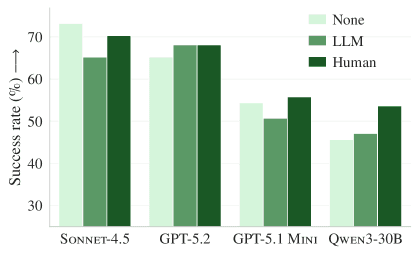
The chart above shows the hard data. Across multiple AI models and benchmark tasks, adding context files (both AI-generated and human-written) consistently reduces task success rates. The AI completes fewer tasks correctly when you give it those "helpful" instructions.
These files also increase costs by over 20%.
It's like a taxi driver taking a longer, scenic route because you gave overly detailed directions. You pay a higher fare for a worse outcome. The AI uses more computational resources ("tokens") to process your instructions, directly increasing your API costs.

The data shows a clear cost increase. More tokens mean higher bills from OpenAI, Anthropic, or other AI providers.
The AI explores more but accomplishes less.
The context files cause the AI to behave like a detective told to "leave no stone unturned" on a simple case. It wastes time investigating irrelevant leads instead of solving the crime. The agent runs more tests, checks more files, and takes more steps—but this extra activity doesn't lead to better results.

As shown above, without context files, the AI gets to work on the actual problem faster. With context files, it takes longer to start working on the right files.
How to Apply This Today
Stop creating detailed instruction files immediately. Here's your action plan for this week:
1. Audit Your Current AI Context Files
Action: Gather every AGENTS.md, CONTEXT.md, .cursorrules, or similar file in your repositories.
How to do it:
- Run a simple search across your codebase:
find . -name "*AGENT*" -o -name "*CONTEXT*" -o -name "*.cursorrules*" - Create a spreadsheet listing each file, its length (word count), and which team uses it
- For example:
/project-alpha/AGENTS.md(1,200 words), used by Frontend Team
Expected effort: 1-2 hours for a team lead. This gives you baseline data.
2. Replace Detailed Files with Minimal Templates
Action: Replace every detailed context file with a simple, 3-5 line template.
Template to use:
```
Project Context
- Language: [e.g., Python, JavaScript]
- Type: [e.g., web service, mobile app, library]
- Key constraint: [ONE sentence, e.g., "Must maintain backward compatibility with API v2"]
```
Example transformation:
- Before: 500-word
AGENTS.mddescribing coding standards, folder structure, testing philosophy, deployment process - After: "Python web service. Must maintain backward compatibility with API v2."
Why this works: The AI reads your actual code better than it reads your descriptions about your code. Give it the essential constraints and let it work with the source files directly.
3. Measure the Impact
Action: Track two metrics for one sprint (2 weeks) after removing detailed context files.
Metrics to track:
- Task completion rate: How many AI-assisted coding tasks get completed successfully on the first try?
- AI usage costs: Compare your monthly AI API bills before and after the change.
Tools to use:
- For task tracking: Your existing Jira, Linear, or GitHub Issues
- For cost tracking: OpenAI usage dashboard, Anthropic console, or your cloud provider's cost analysis tools
Expected result: Based on the research, you should see improved task completion and reduced costs within one month.
4. Train Your Team on the New Approach
Action: Conduct a 30-minute team meeting to explain the change.
Agenda:
- Share the research findings (5 minutes)
- Show your audit results (5 minutes)
- Demonstrate the new minimal template (5 minutes)
- Q&A and address concerns (15 minutes)
Key message: "We're not removing AI assistance. We're making it more effective by removing unhelpful instructions."
5. Create a Policy for New Projects
Action: Add a section to your engineering onboarding documentation.
Policy text:
"For AI coding assistants: Use minimal context files only. Describe the project in 1-2 sentences maximum. Do not create detailed AGENTS.md files. The AI performs better when working directly with code rather than reading our descriptions of the code."
Enforcement: Add this to your code review checklist. Reject PRs that add lengthy context files.
What to Watch Out For
1. The research has limits. The study tested specific coding tasks (SWE-bench and AGENTbench). Performance might vary on entirely different problems, like complex architectural decisions or security-critical code. However, for everyday coding tasks, the findings are clear.
2. There might be rare exceptions. If you have a truly unique constraint that isn't evident in the code itself—like "this function must complete in under 10ms for regulatory reasons"—a brief note might help. But this should be the exception, not the rule.
3. Team pushback. Some engineers believe strongly in detailed documentation. Present the data, not opinions. Show them the research graphs and your own metrics after implementation.
Your Next Move
Start by auditing one project this week. Pick a repository where your team uses AI assistants frequently. Find and delete the AGENTS.md file. Replace it with the 3-line template above.
Then, track what happens. Does the AI seem more effective? Do tasks get completed faster?
Share your results with your team. If you see improvements, scale the approach to other projects.
Question for you: How many hours has your team spent writing AI instruction files that might be making your AI tools less effective? Share your estimate in the comments below.
Comments
Loading...